
How do I design custom earbud boxes with two-tier accessory inserts and spot UV hardware renders?
Short answer: Build a two-tier interior with an upper thumb-notched paperboard or EVA cradle for the charging case and a lower sub-box for the USB-C cord and labeled S/M/L ear-tip card, then pair a soft-touch matte exterior with registered Spot UV over the 3D hardware render on your custom earbud boxes.
On this page
- How do you engineer a plastic-free two-tier paperboard cradle and S/M/L ear-tip card
- How do you set up a glossy Spot UV 3D earbud render on a matte black carton
- What belongs on each panel of a retail wireless earbud box
- How do you prepare the bottom panel for serial numbers, MAC barcodes and FCC markings
- How can audio brands run multiple earbud colorways on one shared dieline
- Common mistakes
- FAQs
Request a custom quoteFree dieline & 3D mockup
Audio buyers judge acoustic engineering and build quality within five seconds of picking up an earbud box. If the outer black ink cracks along the fold lines, or if lifting the lid reveals a flimsy vacuum-formed PVC blister tray and a tangled plastic baggie of silicone ear tips, the hardware immediately feels cheap. Designing a flagship unboxing experience comes down to three details: replacing plastic blisters with a folded two-tier paperboard cradle and a die-cut S/M/L ear-tip organizer card; pairing glare-free matte or velvety soft-touch lamination with a high-gloss Spot UV mask strictly over the front 3D earbud photo; and organizing the back and bottom panels for acoustic specs, FCC/RoHS icons and unvarnished serial-number barcode stickers. At CubitPack, our structural and prepress engineers build your complete dieline set for free starting at 1,000 boxes.
How do you engineer a plastic-free two-tier paperboard cradle and S/M/L ear-tip card?
Major consumer electronics retailers and eco-conscious audio buyers are rapidly phasing out thermoformed PVC and PET plastic blister trays inside headphone packaging. You can achieve a cleaner, stiffer and 100% curbside-recyclable interior by engineering a three-piece paperboard insert system inside your custom printed earbud boxes. First, the upper charging-case platform is die-cut from matching white SBS, black-dyed or natural kraft paperboard with folded side legs that rest on the bottom of the carton. A central contour cutout locks your charging case within 0.5 mm, flanked by two 0.5-inch half-moon thumb notches so the buyer can lift the smooth case out without shaking the box. Second, directly beneath that upper stage sits a flat accessory folder or tuck sub-box holding the coiled USB-C cable and manual. Third, instead of dumping spare silicone ear tips into a loose zip-bag, we die-cut a small paperboard ear-tip card with six locking tabs printed 'S · M · L' that hold each silicone tip pair upright in size order.
- Upper cradle platform: folded paperboard deck (or EVA foam pad for heavy metal IEMs) with two 0.5 in thumb notches.
- Lift tab: integrated paperboard finger hole or ribbon loop on the upper deck so buyers know accessories sit below.
- S/M/L ear-tip card: die-cut friction tabs on a printed card that hold Small, Medium and Large silicone or foam tips.
- USB-C cable wrap: a 0.75 in wide paperboard belly band that replaces plastic twist-ties around the charging cord.
How do you set up a glossy Spot UV 3D earbud render on a matte black carton?
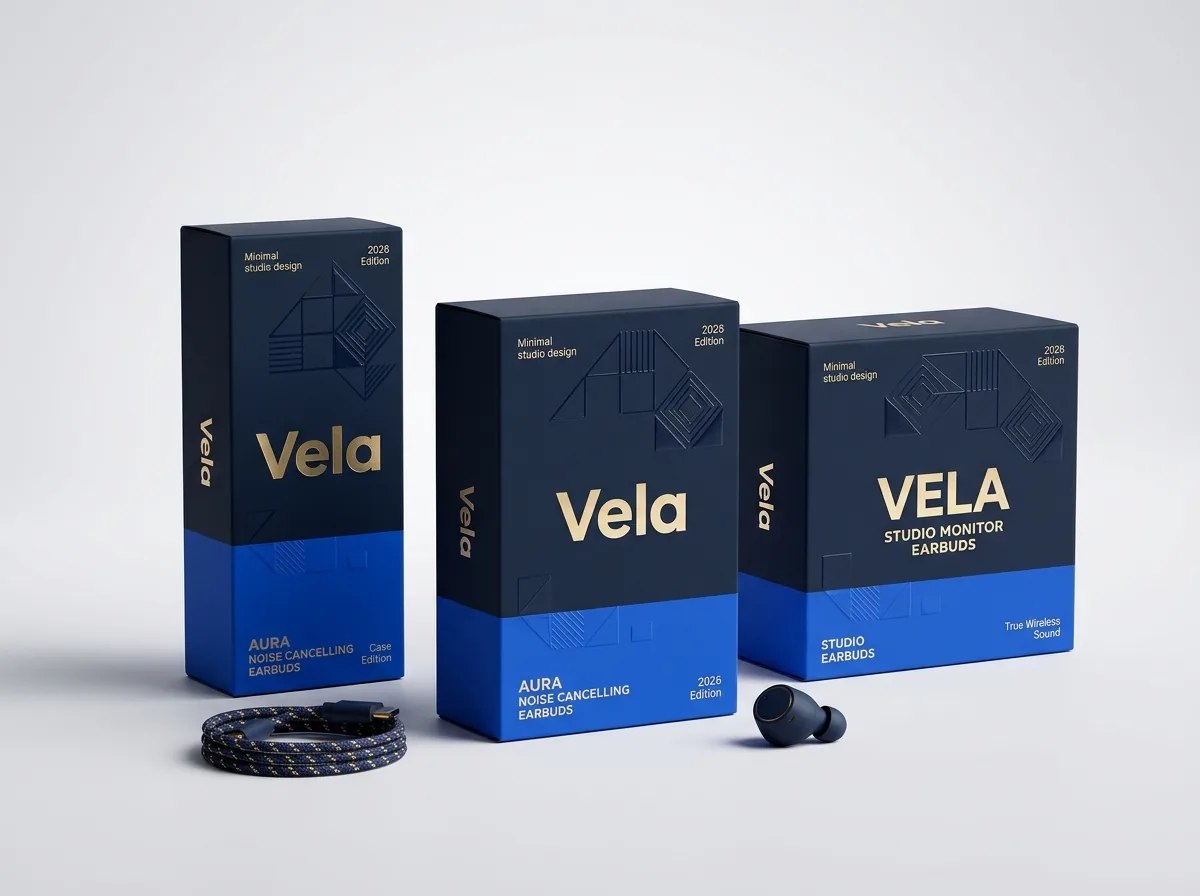
Look closely at the front panel of leading wireless earbud cartons and you will see a signature visual contrast: the background board is a dead-flat charcoal, midnight navy or soft-touch black that absorbs overhead store glare, while the life-size 3D render of the earbuds and charging case gleams like real polished polycarbonate and anodized aluminum. To achieve that effect without fold-line cracking, we first print your rich CMYK or Pantone background and 3D hardware illustration on smooth white SBS paperboard, then laminate the entire press sheet in matte or velvety soft-touch film. Film lamination seals the ink layer so dark black scores never crack and show white paper fibers when folded at 90 degrees. In your vector artwork file, simply place a 100% K (black) vector silhouette on a separate layer named SPOT-UV aligned exactly over the earbud housing, charging case rim and LED indicator dot.
What belongs on each panel of a retail wireless earbud box?
Whether a shopper is comparing three earbud boxes on a retail pegboard wall or zooming in on your gallery photos online, every panel of your carton has a specific job. Use the six-panel layout guide below to organize your 3D render, feature badges, technical specifications and factory barcode zones. Notice how the front panel stays clean and visual (usually five words or fewer below the logo), while the back and side panels carry the comparison specs that audio shoppers scrutinize.
| Box panel or component | Primary merchandising role | Essential graphics, specs & compliance items |
|---|---|---|
| Front panel / top lid | Hero visual & model identity | Brand logo, model name, 1:1 3D earbud + case render (with Spot UV), 3 key badges (e.g. ANC · 36H · IPX5) |
| Back panel | Feature breakdown & whats-in-the-box | 4-6 icon callouts (driver size, mic count, multipoint, fast charge), package contents list, app QR code |
| Left side panel | Colorway indicator & lifestyle cue | Pantone colorway swatch dot + color name (e.g. 'Glacier White'), actual-size earbud side profile |
| Right side panel | Technical audio specifications | Bluetooth version, supported codecs (AAC/LDAC/aptX), driver mm, battery mAh, charging port (USB-C / Qi) |
| Bottom panel | Regulatory & factory serialization | Unvarnished knock-out rectangle for UPC/EAN, Serial (S/N) & MAC barcodes; FCC ID, CE, RoHS, WEEE, UN3481 note |
| Inside lid / inner tray | First-open onboarding & pairing | 3-step Bluetooth pairing graphic, ear-tip fit test tip, QR link to companion EQ app |
Know your size? Compare pricing across up to 3 quantities.
Request a Quote →How do you prepare the bottom panel for serial numbers, MAC barcodes and FCC markings?
On an electronics assembly line, every individual earbud box receives a unique thermal-transfer sticker or high-speed UV inkjet print carrying the unit's serial number (S/N), Bluetooth MAC address, manufacturing date and retail UPC barcode. If your entire carton is covered in velvety soft-touch lamination or slick UV varnish, thermal-transfer adhesive labels can curl and peel off in warm warehouses. To guarantee permanent label adhesion, we create an unvarnished or glue-free knock-out rectangle (typically 2.5 × 1.0 inches or 3.0 × 1.25 inches) on the bottom panel where bare printed paperboard or matte-printable coating remains exposed. Alongside that barcode zone, include your required FCC Part 15 compliance statement, FCC ID number, CE/RoHS/WEEE crossed-out wheelie-bin icon, and lithium-ion cell wattage capacity for air-freight and parcel screening. Always print static UPC/EAN barcodes in 100% black ink on a crisp white box so retail laser and camera scanners read them instantaneously.
How can audio brands run multiple earbud colorways on one shared dieline?
Most wireless earbud and IEM models launch in three to five hardware finishes - such as Matte Black, Glacier White, Cobalt Blue, Sage Green and Rose Gold. Because the physical charging case and accessories are identical in size across every finish, all of your colorways share 100% of the same outer box dieline and internal two-tier custom cardboard inserts or custom EVA foam inserts. Keep your internal cradle unprinted (or printed in a neutral charcoal or white that works with every colorway) so you can run a single bulk batch of inserts, and split your outer carton print run across your 3 or 4 colorway designs starting at 1,000 total boxes. You pay zero die or plate charges, receive 10% off your first order, and inspect a 2D digital proof and interactive 3D mockup of every colorway before payment.
- Neutral shared insert: use one white or black two-tier cradle across all hardware colorways to maximize volume savings.
- Colorway spine badge: place a Pantone color circle and colorway name on the side spine so warehouse pickers spot the SKU instantly.
- Inside lid onboarding: print your 3-step Bluetooth pairing guide inside the lid to reduce customer support tickets.
- Worldwide DDP delivery: ship finished boxes free to any US warehouse, or via DDP directly to your overseas assembly factory.
What are the most common earbud box design and prepress mistakes?
Even flagship audio graphics can look scuffed on the shelf if finishes and internal cradles are set up wrong. Avoid these five mistakes
- Printing solid black ink on unlaminated cardstock, which cracks and exposes white paper fibers along every 90-degree fold score.
- Using a fragile thermoformed PVC plastic blister tray that cracks in cold transit instead of a folded paperboard cradle or EVA foam pad.
- Packing spare S and L silicone ear tips loose in a polybag where they get lost, instead of locking them onto a labeled S/M/L card.
- Applying soft-touch film or Spot UV over the bottom serial-number and UPC sticker zone, causing factory thermal labels to lift.
- Crowding the front panel with a 50-word paragraph of specs instead of a clean 1:1 hardware render and three concise feature badges.
Find your size
Suggested inside size: 3.5 × 3.5 × 1.625 in
A starting point. Your account manager confirms the size with you before the proof.
Quote this size →Packaging for this
Ready to order earbud boxes? Compare up to 3 quantities with a free 3D mockup.
Request a Quote →Questions about earbud boxes
Will CubitPack engineer the two-tier charging case cradle and ear-tip card for free?
Yes. Every order includes free structural engineering and free design help. Send us the millimeter dimensions (or a sample) of your charging case, USB-C cable and ear tips, and we build the complete vector dieline set at no charge.
How do we set up our artwork file for Spot UV over the earbud render?
Place your full-color artwork on the CMYK print layer, and create a separate vector layer named 'SPOT-UV' filled with 100% K (black) strictly over the earbud, charging case and logo areas you want glossy. Our prepress team will verify registration on your proof.
Should we use paperboard or EVA foam for our earbud box insert?
Use a folded paperboard cradle and S/M/L ear-tip card for true wireless charging cases when you want a 100% paper, plastic-free package that ships flat. Choose die-cut EVA foam when displaying heavy metal or resin audiophile IEM earpieces outside the case.
How do you stop dark matte black earbud boxes from showing fingerprints?
We laminate dark cartons with anti-fingerprint matte film or velvety soft-touch lamination. Both coatings seal the dark ink against fold-line cracking and resist oil smudges when handled by retail shoppers.
Can we order matching printed insert cards or quick-start folders with our boxes?
Yes. Alongside your outer earbud carton and two-tier cradle, we print custom insert cards, S/M/L ear-tip organizer cards, Bluetooth pairing cards and tamper-evident wafer seals so your entire packaging kit matches.
What is the minimum order and turnaround time for custom earbud boxes with inserts?
Our minimum order is 1,000 folding cartons (or 50 rigid boxes). Standard production takes 10 to 14 business days after proof approval, with 4 to 5 business day rush available and free delivery across all 50 US states.
Still have a question? Ask a packaging specialist.
Request a Quote →Request your earbud boxes quote
Tell us your size and quantities, and one dedicated account manager prepares pricing for each tier.
- Free design & AI-to-print studio + 3D mockup
- No die or plate charges · 4–5 day rush available
- Free shipping to all 50 states
- 10% off your first order
The two-tier insert mechanics, Spot UV prepress setup (0.25 mm pullback margin) and 6-panel consumer electronics labeling checklist in this guide reflect CubitPack's decided specifications in our published product specifications and standard audio hardware packaging practices. A packaging specialist verified every section. Spot an error? Tell us and we will fix it.
Sources
What changed
- October 22, 2026: First published.
- October 22, 2026: Updated specifications, terminology, and verified source links.
More guides
New packaging guides by email
Sizes, materials and design tips. Unsubscribe anytime.